No Universal Concert Photo Deadline Exists
A concert photo delivery turnaround is a commitment you negotiate, not a rule you inherit. Set length, travel, card volume, edit depth, captioning, approval loops and upload time all move the realistic handover. Quoting a fixed 24-hour or 48-hour standard before those are known is how a workable shoot turns into a late gallery.
The range of real requests is wider than one number. Music photographer Todd Owyoung's 2022 workflow article describes clients asking for images within an hour of a festival set finishing, and same-night edits after a concert (6 tips for a Faster Editing & Processing workflow for Event Photography). Those examples show what some clients want. They are not an industry deadline, and the article does not present them as one.
His more useful planning point is that speed comes from the whole chain. He suggests making fewer frames when turnaround is tight, rating or locking selects in camera, culling before full processing, and building processing and export presets. He also treats wireless FTP with dedicated live editors as a high-budget production setup, not the baseline for a solo photographer.
Split the Promise Into Two Deliverables
Treat the job as two deliverables rather than one elastic promise:
- A rush-selects batch: a small, explicitly counted set of finished frames, due at a stated clock time.
- The complete edited gallery: every image in the agreed deliverable count, culled, edited, captioned and exported to the agreed format.
Separating the batches makes the deadline and the scope explicit. It also stops a request for "a few photos tonight" from silently becoming a demand for the entire gallery. The time saving is not a measured quantity; the value is that both sides know which work is due first.
Give each batch its own record. The rush set is delivered when the agreed frames have been sent to the agreed destination and they open correctly from the delivery link. The full gallery is recorded the same way, not when the export progress bar disappears.
Client confirmation is recorded separately: received, or awaiting confirmation. A missing confirmation means the record is incomplete on that point; it does not mean the files were never delivered. Checking that files open from the link is useful evidence that access works, but it is not a legal acceptance test.
Settle Four Numbers Before the Show
Every delivery agreement needs four answers, and all four belong in writing before the set:
- Count: the exact number of finished images, and whether alternates count toward it.
- Clock: the due time with a time zone, and whether the clock starts at the end of the set, the shoot date or final payment.
- Format: file type, pixel size, color space, watermark policy and any crop requirement.
- Contact: the delivery destination and the named person who is asked to confirm that the files arrived and open.
The site's pre-shoot agreement checklist covers the same ground in contract form: how many final edited images, whether alternates count, when delivery is due, in what format and resolution, and whether RAW files are a separate negotiation (Concert Photography Agreements: A Pre-Shoot Questions Checklist). It also asks who chooses the selects and what "edited" includes, two answers that change how long the batch actually takes.
Decision Table: Which Commitment to Fix First
Situation | Fix first | Why it matters |
|---|---|---|
Client needs something for social the same night | Rush-select count and clock time | A small batch can be finished and verified before the full gallery exists |
Client needs images for a press pitch next week | Final gallery date and output format | The whole set has to be culled, edited and captioned before handover |
Client asks for "all the photos" | Deliverable count and what counts as edited | An open-ended count removes any honest estimate |
Client wants RAW files | Whether RAW is included, as a separate agreement | RAW handover is a different scope from a finished gallery |
Venue access is still unconfirmed | Access window and fallback plan | Access, not editing speed, may decide what can be delivered |
Build a Relative Schedule, Not a Service Level
A relative schedule is easier to defend than a fixed promise. Anchor each stage to the end of the set, then adjust the intervals to the show you actually shot.
The schedule below is a hypothetical example only. It shows how a relative schedule can be written down; it is not a recommended standard, not advice that every assignment should meet, and not a service level:
- Same evening, in this example: a handful of rush selects culled, processed from a preset, exported and checked.
- Next day or two, in this example: the full gallery culled, edited, captioned and exported.
- Before the gallery link goes out: a spot check that files open at full size on a second device.
A festival day with multiple stages, a long travel leg or a late credential change can move every one of those intervals. Written deadlines are agreed commitments, not a description of what is typical. Say so in the agreement, and keep the two batches on separate clocks.
Execute the Rush Batch Separately
The rush batch is a different job from the gallery, so give it a different process:
- Cull before you process. Rate in camera where you can, then make one pass for focus, exposure and expression.
- Keep the set small enough to finish properly. The count should be agreed, not discovered at midnight.
- Apply a processing preset as a starting point, then correct only what the frame needs.
- Export with the agreed preset so size, format and color space match the deal.
- Open the exported files from the delivery destination, not only from the local folder.
A repeated editing order helps here. The site's restrained Lightroom workflow corrects color cast first, then tone, then noise at 100% zoom, then skin tones, with a stopping condition at each stage (Editing Concert Photos in Lightroom: A Restrained Workflow). That order is useful under time pressure because it prevents rework when a color change alters how the noise looks.
Run the Full Workflow in Order
Cover the full workflow in order: backup, cull, edit, caption, export, verify and notify. Each stage has a finish line, and skipping one usually reappears as a client email.
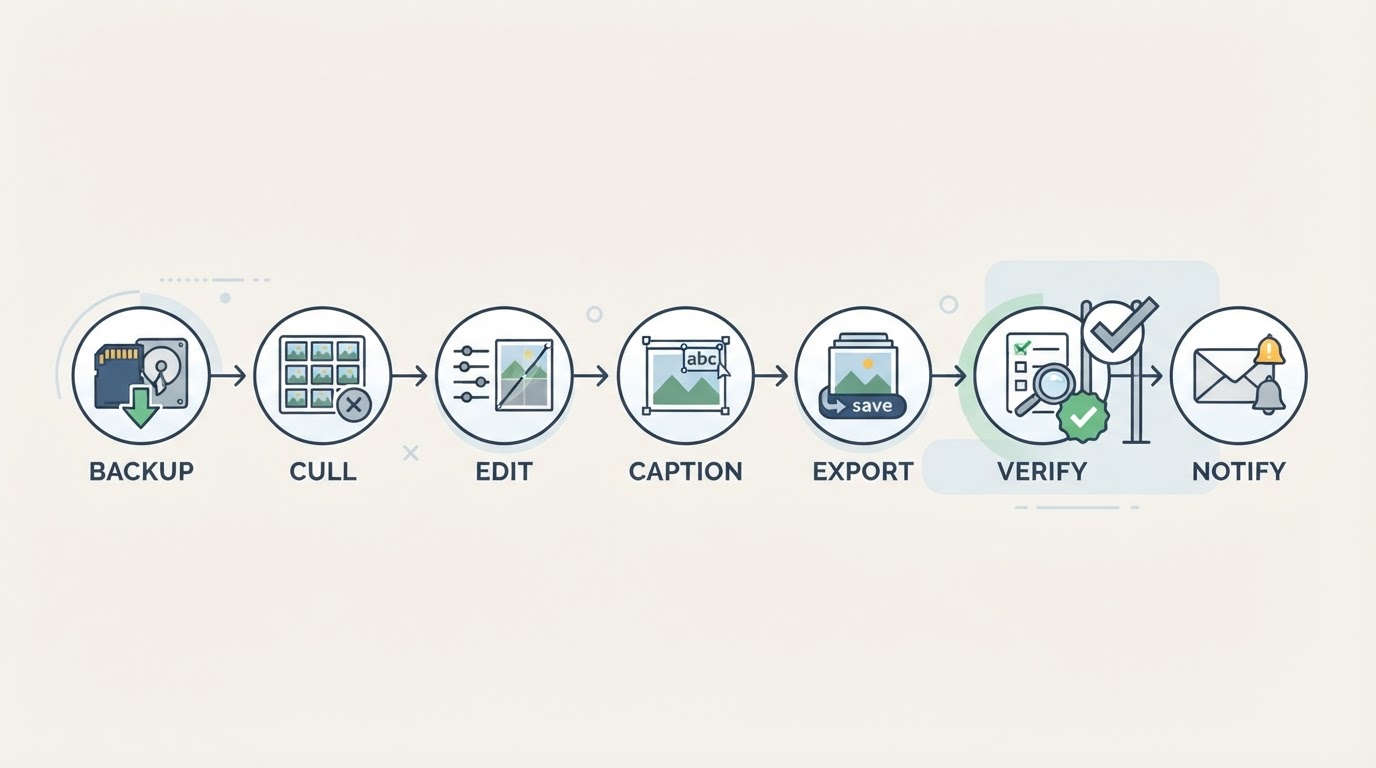
- Back up: copy the originals to independent locations and check that readable representative files open and, where available, that integrity checks pass. A matching file count is not by itself proof of a usable copy.
- Cull: keep the frames that meet the agreed count and the quality bar, and mark the rest.
- Edit: work from a preset, then fix color, tone and noise in a consistent order.
- Caption: add names, venue, date and required credit while the details are still fresh.
- Export: use the agreed format and size, and keep the export settings with the job record.
- Verify: open the delivered files and download one from the client's side of the link.
- Notify: send the delivery message to the named contact, record the batch as delivered, and note confirmation as received or awaiting confirmation.
Back Up Before You Clear a Card
Redundant in-camera recording is useful, but two slots still sit inside the same camera. A single external copy is not verified redundancy either, and neither is a matching file count on its own. Follow the photographer's backup policy and retain the card originals until at least two independent, verified copies of the originals exist elsewhere. Verification means opening readable representative files and, where the tools are available, checking file integrity — not counting files alone.
Gallery JPEGs are delivery files, not a backup of the RAW originals. A gallery link the client can download from does not protect those originals.
Do not erase or reformat a card merely because an upload finished or a gallery link is live. Retention and access windows belong in the agreement, not in an assumption about how long a gallery link will stay open. Treat this as a planning rule rather than a report of a tested workflow.
Budget the Whole Chain, Not Only the Sliders
Editing is the visible part of turnaround, but other stages can dominate the clock. Captioning, file verification, upload time, client access problems and revision rounds all sit on the same schedule. Build the estimate from the whole chain.
Revision scope is negotiated, not assumed. Agree what revisions, if any, are included, and by what date. Do not treat a corrections round as free extra work that the estimate quietly absorbs.
If the schedule is tight, scope is a lever: the deliverable count, the edit depth and the deadline can all be discussed. There is no proof that a smaller batch is always cheaper or faster. What changes is what both sides have agreed to deliver, and that should be written down.
Send One Message That Confirms the Deal
A written confirmation prevents the two batches from collapsing into one vague promise. Send it before the show, then repeat the same facts when the files go out.
Delivery confirmation for artist at venue, date
Rush selects: number finished images by time time zone on date, delivered as agreed rush format and size to destination.
Final gallery: number finished images by time time zone on date, delivered as agreed final format and size.
Revision scope/deadline: agreed revision scope/deadline, if any.
Please confirm receipt to contact. Planned access window: window.
If the set runs long, access changes or the venue restricts coverage, I will notify you before cutoff and we will agree next steps on scope and timing.
Blank Planning Table
Copy this table into the job record and fill it in with the client. A blank cell is an open question, not a default.
Batch | Image count | Due time and time zone | Format and size | Destination | Confirming contact | Delivery status | Confirmation |
|---|---|---|---|---|---|---|---|
Rush selects |
|
|
|
|
|
|
|
Final gallery |
|
|
|
|
|
|
|
Record delivery and confirmation separately. Delivery status says whether the agreed files went out and open from the delivery link. Confirmation says whether the named contact has replied — received or awaiting confirmation. A missing confirmation is an open question in the record, not evidence that nothing was sent.
Agree Retention and Handle Late Changes
Retention, access and revision terms should be agreed explicitly. A gallery link that stays open indefinitely is not a legal entitlement, and a promise to keep RAW files "forever" is not a delivery plan. Write down how long the gallery stays available, whether downloads are enabled, and how a correction request is handled after the handover.
When the deadline is at risk, tell the contact before the clock runs out and agree next steps. A written deadline is an agreed commitment; announcing a new time on your own does not by itself amend the agreement. If both sides accept a revised scope and timing, put the change in writing and keep it with the job record.
A realistic turnaround is not the fastest number you can say out loud. It is the one both sides can point to in writing, with the batch, count, clock time, format and contact named.